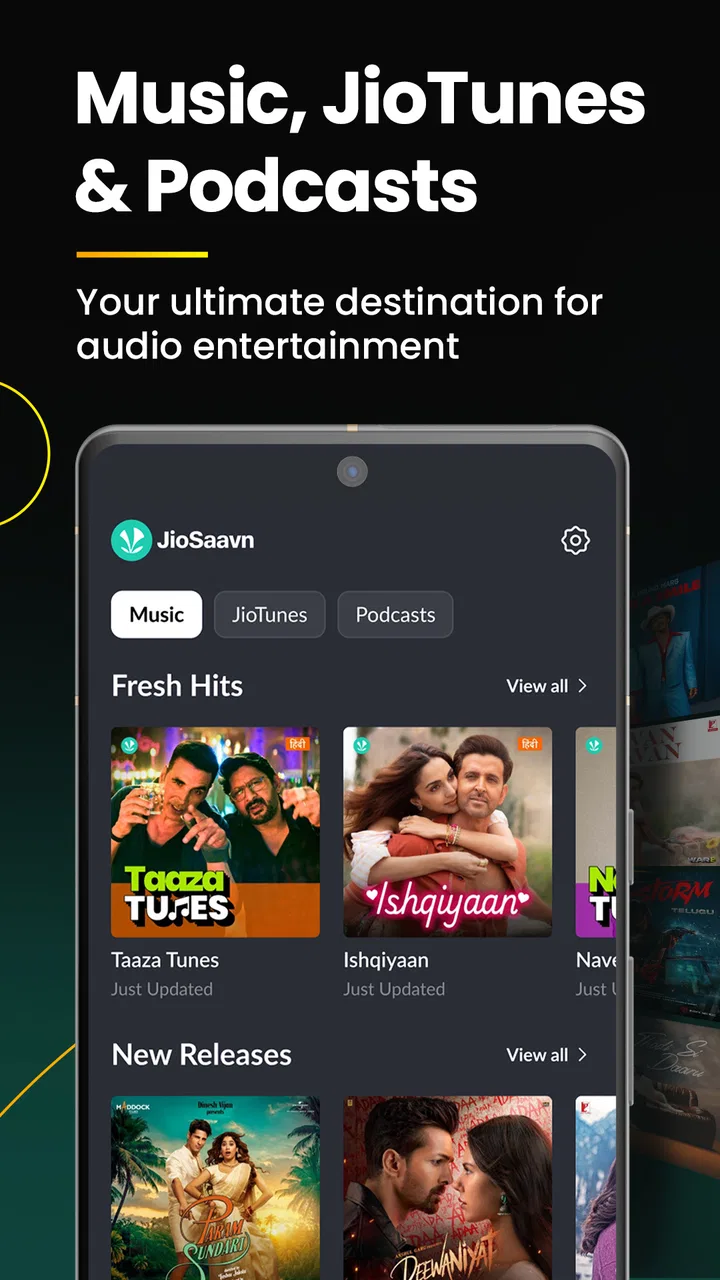
JioSaavn - Music & Podcasts
- 4.3
- Rating
- 500.00M
- Installs
- Free
- Price

 Analysis by App-foxy
I usually open a music app with a very ordinary goal: I know the mood I want, but not always the exact song. With JioSaavn, that starting point works especially well when I want music from different Indian language scenes without switching between several services. It is a free music and audio app from Saavn Media Limited, rated for Everyone, and it supports music in 16 languages. That combination makes it more useful than a simple playlist player for listeners who move between Hindi, Tamil, Telugu, Punjabi, Marathi, Bengali, and other regional catalogs.
My overall impression is that it is easiest to appreciate as a discovery-and-listening companion rather than as a perfectly neutral music library. I can search for a familiar track, follow what is currently popular, save music for later, and use downloads when I expect to be away from a reliable connection. The experience is not frictionless in every situation, and the free model means I have to accept some limitations and optional purchases. Still, the app has a clear identity, and its huge audience—more than 500 million installs and an average rating of 4.3 from around 8.7 million ratings—shows why it remains a serious choice.
From a vague mood to a usable listening session
I find that the useful question here is not whether JioSaavn opens quickly in every circumstance, but how much work it takes to turn a passing mood into music I can actually use. This section looks at the choices that make that process smoother, especially when I am switching between languages or searching without a song title in mind. The next part considers how those choices carry through once I start saving, organizing, and preparing music.
You May Also Like

 AccuWeather: Weather Radar
AccuWeather Review: A Quick, Clear Forecast for Everyday Decisions
For everyday plans, the best forecast is the one you can understand quickly. AccuWeather makes rain timing, radar, and local conditions easy to act on, with a few trade-offs.

 Hill Climb Racing
Why Hill Climb Racing Still Turns Crashes Into One More Run
A tiny car, a bumpy hill and one more upgrade: Hill Climb Racing keeps resurfacing because its simple chaos makes every near-miss feel personal.

 AliExpress - Shopping App
AliExpress Makes Global Shopping Feel Personal, but Shoppers Bear the Risk
AliExpress turns a global marketplace into a pocket-sized discovery engine. Its reach is useful, its shopping loop compelling, and its trade-offs easy to miss.

 Lords Mobile: Kingdom Wars
Lords Mobile Is a Kingdom-Building Routine, Not a Quick Match
A case-by-case verdict on the building, battles, device demands, and social commitments that make Lords Mobile rewarding for some players and exhausting for others.

 PDF Scanner app - TapScanner
TapScanner Makes Paperwork Easier to Capture, Check, and Share
TapScanner makes scanning with a phone feel less like a rescue operation and more like a dependable step in getting work done. Its capture tools are useful, though not flawless.

 Block Blast!
Block Blast! Shows How Much a Puzzle Game Can Leave Out
A quiet grid game shows why puzzle players increasingly value instant clarity, repeatable skill and low-pressure play—and where the genre still needs to catch up.
More From Our News Desk
View All News


The first decision is not the song, but the language and context
When I start with a specific song, the process is familiar: search, check the result, and play it. The more interesting workflow begins when I only know the situation. Perhaps I am cooking and want energetic Punjabi music, commuting and want recent Hindi releases, or trying to reconnect with songs from a family playlist in another language. JioSaavn is particularly comfortable in that middle ground because its language range gives the search a useful direction before I even choose an artist.
I find it helpful to decide whether I am looking for a single track, an artist, a film-related song, or a broader mood. Searching too generally can produce a busy set of results, especially when song titles are transliterated in different ways. Adding the artist or using the original script when I know it usually reduces the time spent checking near-matches. This is a small habit, but it matters more here than it would in a service focused mainly on English-language music.
The app also makes sense for listeners who want a bridge between familiar hits and newer releases. I can begin with a song I already know, then move toward related recommendations or current selections. That handoff from personal memory to discovery is one of the strongest reasons to use it. A conventional local music player can play files I already own, but it cannot give me the same path from one known track into a wider regional catalog.
Building the session instead of tapping randomly
Once I find a promising track, I do not immediately fill a large playlist. I usually test the first few songs in sequence and notice whether the selection actually fits the setting. This is useful because a playlist that looks appropriate by title can shift in tempo, language, or style more than expected. JioSaavn is better when I treat discovery as an active process: keep the songs that work, skip the ones that do not, and gradually shape a listening queue around the moment.
For a daily routine, I recommend creating separate listening groups rather than one enormous collection. A short travel set, a work-friendly set, and a high-energy set are easier to reuse than a single library that mixes everything. This approach also makes downloads more practical. Instead of saving every interesting discovery, I can reserve offline space for music I am genuinely likely to play during a flight, a weak-signal commute, or a long day away from home.
That distinction between saving and downloading is important. Saving a track helps me return to it later, while downloading is a preparation step for listening without depending on a connection. I treat those actions differently: I save broadly while exploring, then download selectively after I know what belongs in an offline session. It prevents the app from becoming a cluttered archive of songs I liked for only thirty seconds.
Where JioTunes fits into the everyday flow
One feature that gives the service a more local, personal feel is the option to set trending JioTunes. I see that as a different use case from ordinary music playback. Instead of choosing a song only for private listening, I can use a current track as a caller tune and make it part of how others encounter my phone. That makes the app relevant even when I am not actively sitting down to listen.
The practical tip is to choose the tune with the audience in mind. A track that is exciting during a workout may be less suitable when friends, relatives, or work contacts call. The trending angle is useful for discovering options, but popularity alone should not decide the choice. I would browse the current selections, listen to the relevant portion, and then pick something that still feels comfortable after repeated exposure.
A realistic morning-to-evening example
Imagine a weekday morning when I need music for a train ride. I begin by searching for a familiar Hindi artist, then use that starting point to find newer tracks with a similar feel. I save several candidates while I am connected to Wi-Fi, remove the songs that do not fit the pace, and download the final group before leaving. During the ride, I can move through that prepared selection instead of repeatedly searching through mobile data.
At lunch, I might switch languages entirely and search for a Telugu or Tamil playlist for a different atmosphere. In the evening, I can return to the saved discoveries and decide whether any deserve a place in a permanent collection. The outcome is not just one uninterrupted playlist; it is a repeatable workflow that moves from exploration to selection, then from selection to offline preparation. That sequence is where the app feels most useful.
How the handoffs work—and where they become awkward
A listening session often crosses several small boundaries: finding a track, deciding whether to keep it, and making sure it will be available when my connection is unreliable. I pay attention to those handoffs because they reveal where JioSaavn feels convenient and where a little advance planning helps. The following section focuses on those transitions, including the moments when I would rather use a simpler or more specialized alternative.
From search results to the right recording
The first handoff is from an idea in my head to a playable result. This is where spelling, language, alternate versions, and artist names can create friction. If I search only a short title, I may need to inspect several results before choosing the recording I actually want. I avoid that by adding an artist name or album context whenever possible.
This is not a reason to reject the app, but it changes how quickly it feels. Someone who expects every search to behave like a perfectly curated personal library may find the result screen less decisive. Someone comfortable checking a few entries will usually get where they need to go. The broad language coverage is valuable, but breadth naturally places more responsibility on the listener to identify the correct version.
From discovery to a personal collection
The second handoff is deciding what deserves a place beyond the current session. I prefer to save songs immediately when they catch my attention, then review that collection later. Doing both actions at once—listening, judging, organizing, and downloading—makes the process feel like work. Separating discovery from housekeeping keeps the app enjoyable.
This is also where JioSaavn differs from a basic radio-style experience. I am not limited to accepting whatever comes next; I can make deliberate choices and build a reusable set. On the other hand, listeners who want an entirely hands-off stream may find this level of selection unnecessary. If my priority is simply pressing play and never managing anything, a more automation-first service may feel calmer.
From online listening to offline preparation
Downloads are most useful when I plan around them rather than treating them as an emergency button. Before leaving home, I check that the music I want is actually prepared while I still have a dependable connection. I also avoid downloading every album that looks interesting. A focused offline set is easier to navigate and less likely to leave me searching through forgotten choices when I am already disconnected.
The trade-off is that offline listening changes the way I discover music. When I am without a connection, I am working from the decisions I made earlier. That is excellent for predictable routines, but less ideal if I want constant access to the newest suggestions. I therefore use online sessions for exploration and offline sessions for reliability. Keeping those purposes separate gives the feature a clear role.
What the free experience means in practice
The app is free to install and use, which lowers the barrier for trying it with a small collection of favorite artists. There are in-app purchases ranging from less than a dollar to nearly sixty dollars per item, so I would pay attention to the purchase screen and decide whether an optional upgrade or item genuinely improves my routine. I would not subscribe simply because the catalog is large; I would first identify the specific friction I want to remove.
For a casual listener, the free entry point may be enough to search, sample, and establish a habit. For someone who listens for many hours each day, downloads extensively, or wants a more controlled experience, the paid options may become more relevant. The important point is to judge the value against actual use rather than assuming that every feature has equal importance.
How it compares with the usual alternatives
Compared with a local music player, JioSaavn offers a much easier route to new releases, regional catalogs, and trending selections. A local player remains better when I want complete control over files I already own, a simple interface with no discovery layer, or playback that is independent of a streaming catalog. The two tools solve different problems, and keeping both can make sense.
Compared with a broad international streaming service, JioSaavn’s clearest advantage is its emphasis on Indian music across many languages. If most of my listening is global pop, Western classical music, or a highly specialized international niche, another service may provide a deeper or more familiar experience. If my household regularly switches between Indian languages, however, the language coverage here can make the choice feel more natural than a larger but less focused competitor.
Compared with a video platform used for music, this app is more focused on listening as an activity. I do not need to treat music videos, comments, or visual browsing as part of the main routine. That can make it a better fit for commuting, cooking, or background listening. A video platform may still win when I specifically want live performances, visual versions, or informal uploads rather than a music-centered library.
Who should use it, and who should skip it
I would recommend JioSaavn to people who listen across Indian languages, enjoy following current songs, and want one place for discovery, regular playback, downloads, and JioTunes. It is also a good starting point for families or friend groups whose tastes overlap only partly. One person can begin with a familiar artist while another explores a different language, without forcing the whole experience into one narrow genre.
I would be more cautious if my priority is a completely ad-free, highly controlled listening environment from the first tap, or if I mainly need a player for a carefully organized collection of owned audio files. Audiophiles who choose a service primarily by technical playback controls should also compare alternatives directly before settling here. JioSaavn’s strongest argument is its catalog access and cultural breadth, not the promise of being the perfect tool for every listening philosophy.
The result after a week of sensible use
Used deliberately, the app turns a vague request—“I want something good for this moment”—into a practical result. I search with enough detail to avoid confusion, explore without downloading everything, save promising tracks, review them later, and prepare compact offline sets for predictable situations. I can also use trending JioTunes when I want music to play a role beyond private listening.
The payoff is convenience with a personal layer. I am not merely pressing a generic play button; I am building a path from language and mood to a usable session. That path is especially effective when my listening changes throughout the day or when I move between regional music communities.
Where the workflow breaks down
The flow becomes less satisfying when I expect instant precision from a vague search, unlimited hands-off discovery, or the simplicity of a local file player. Broad catalogs can require extra checking, and a free service with optional purchases may not match the expectations of someone seeking the most controlled premium experience. Downloads also require planning: they help after preparation, not before it.
Those limitations are manageable if I understand the app’s role. I would not choose it solely for minimalist playback or for a narrowly specialized international catalog. I would choose it when language variety, current Indian music, offline preparation, and JioTunes all matter in the same routine.
After using it in that way, my recommendation is straightforward: try JioSaavn if your listening life crosses Indian languages or you want discovery that feels connected to regional music culture. Its Everyone age rating and minimum requirement of Android 8.0 make it approachable for many users, while the free price makes experimentation easy. It is not flawless, but it gives the right listener a complete route from finding a song to making it part of everyday life.
FAQs for JioSaavn - Music & Podcasts
01What is JioSaavn and what features does it offer?
JioSaavn is a popular music streaming app available on Android and iOS platforms, offering a vast library of songs across various genres and languages. It also provides users with access to podcasts, radio stations, and exclusive content. Features include personalized playlists, offline downloads, and high-quality audio streaming. With both free and premium subscription options, JioSaavn caters to diverse user preferences.
02Is JioSaavn free to use, and what are the benefits of the premium version?
JioSaavn offers a free version that includes access to its comprehensive music and podcast library, albeit with advertisements and some limitations on features. The premium version, known as JioSaavn Pro, removes ads and allows for offline downloads, unlimited skips, and access to high-quality audio streaming. Subscribing to Pro enhances the overall listening experience significantly.
03How does JioSaavn compare to other music streaming apps?
JioSaavn stands out due to its extensive collection of Indian music across multiple languages, making it especially appealing to users interested in regional content. While other platforms may offer similar features, JioSaavn's focus on Indian music and its integration with Jio services provide a unique advantage. Its competitive pricing and the availability of exclusive content also contribute to its popularity.
04Can I listen to JioSaavn offline and on multiple devices?
Yes, JioSaavn allows offline listening, but this feature is exclusive to JioSaavn Pro subscribers. Users can download their favorite tracks and playlists to their devices for offline access. Additionally, JioSaavn supports multi-device usage, allowing you to enjoy your music seamlessly across smartphones, tablets, and computers, although simultaneous streaming on multiple devices may be restricted.
05What are the system requirements for installing JioSaavn on my device?
To install JioSaavn on Android devices, you typically need Android version 5.0 (Lollipop) or higher. For iOS devices, the app requires iOS 11.0 or later. Regular updates may change these requirements, so it's advisable to check the app store for the latest compatibility information. Ensuring your device meets these requirements will provide a smooth and efficient user experience.
Pros
- Extensive music library with diverse genres.
- User-friendly interface for easy navigation.
- High-quality audio streaming options.
- Offline download for music on the go.
- Regular updates with new features.
Cons
- Ads can be intrusive in the free version.
- Limited offline downloads in free tier.
- Some content is region-restricted.
- Occasional app performance lags.
- Subscription needed for full features.

JioSaavn - Music & Podcasts
Gallery